Desktop Power in Your Lap: Optimizing the Best Charting Apps for iPad Pro
Have you ever sat at your desk, tethered to a multi-monitor setup, only to realize the market is moving while you're stuck in traffic? I’ve spent the last few months trading exclusively from my 12.9-inch iPad Pro, and honestly, the shift was eye-opening. You aren't just getting a glorified mobile browser anymore; modern tablet hardware paired with specialized software can actually rival a desktop workstation if you choose the right tools. 
The Gold Standard: Why TradingView Dominates the Tablet Space
When we talk about the best charting apps for iPad Pro, TradingView is the elephant in the room for good reason. It’s built for the web, meaning it translates perfectly to the Safari environment on iPadOS. I've found that the touch-first interface makes drawing trendlines and Fibonacci extensions feel more intuitive than using a mouse. It handles 50+ concurrent indicators without the lag I used to see on older laptop hardware.
best overall recommendation
Niche Powerhouse: GoChart for Scalpers
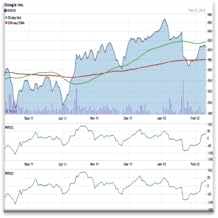
If you need something that feels less like a website and more like a dedicated trading station, look at GoChart. It offers a slightly different workflow, prioritizing speed and real-time data visualization. It’s perfect for those who want to see depth of market and order flow directly on the tablet without the 'fluff' of social community features. Here is how the interface looks when you have a custom workspace set up for quick execution: 
Lightweight Alternatives for On-the-Go Analysis
Sometimes, you don't need a full-blown platform. If you're just keeping an eye on your portfolio, apps like Investing.com or Yahoo Finance offer solid, basic charting. They won't replace a pro platform, but they are great for quick, high-level analysis when you’re grabbing coffee.
budget alternative
Common Mistakes to Avoid
- Overloading your workspace with too many complex indicators that make the iPad screen feel cramped.
- Neglecting to use a stylus; the Apple Pencil is a game-changer for precision drawing that your finger simply cannot match.
- Relying solely on Wi-Fi without a cellular backup for mission-critical order execution.
- Forgetting to update your iPadOS, as trading apps often rely on the latest web-rendering engine improvements.
Quick Comparison
| App | Best For | Complexity |
|---|---|---|
| TradingView | Overall Analysis | High |
| GoChart | Order Flow/Scalping | Medium |
| Investing.com | Market Tracking | Low |

Who This Is For
This guide is for active retail traders who travel frequently or simply prefer the minimalist aesthetic of an iPad workspace. It is perfect for those who want to bridge the gap between casual app-based trading and full-scale technical analysis.
Ultimately, the 'best' tool is the one that lets you execute your strategy without friction. My advice is to try the web-based versions first before committing to any specific subscription.
Frequently Asked Questions
Can you actually day trade professionally on an iPad Pro?
Yes, provided you use high-quality charting apps and a stable internet connection. While some complex algorithmic tasks are still best left to desktops, standard technical analysis and manual execution are fully capable on iPadOS.
Do I need the Apple Pencil to chart effectively?
While not strictly required, I highly recommend it. It provides the pixel-perfect precision needed for drawing trendlines, channels, and Fibonacci levels that fingers simply cannot replicate.
Are web-based charting apps better than native iPad apps?
Often, yes. Web-based platforms like TradingView are updated more frequently and offer the exact same feature parity as their desktop counterparts, whereas native apps are sometimes 'light' versions.
Product Comparison
| # | Product | Price | Rating | |
|---|---|---|---|---|
| 1 | |
Product B01LP0G912 | — | 1.0 out of 5 stars |
| 2 | |
Product B007JL8N5M | — | 3.0 out of 5 stars |
| 3 |  |
Product B0FRT3F9Y4 | — | 3.6 out of 5 stars |